Something you might find helpful as you start the school year is printing blank rosters with gridlines. Click the link below for directions on how to print your class rosters from Skyward!
Print Class Rosters with Gridlines

7.18.2018
Welcome New Teachers!
***New Teachers will receive an email from me with their Skyward login before Monday, July 23rd. Please call me if you have not received your login or have issues logging in!
This site has all the self-help documents you need to get started with Skyward. You are always more than welcome to call or email me for help. Please click on the links at the right to find your specific area of training documents.

This site has all the self-help documents you need to get started with Skyward. You are always more than welcome to call or email me for help. Please click on the links at the right to find your specific area of training documents.
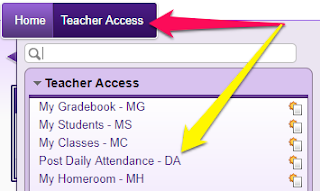
One quick tip I'd like to share with you is the SUPER easy way you'll take attendance:
(1) Click on the Teacher Access tab and select Post Daily Attendance

(2) Click By Name

(3) All students are marked present by default. You'll mark those who are tardy or absent and click SAVE when you are done!
Call me at X8668 or email denise.thornberry@wayne.k12.in.us
4.02.2018
Creating Student Groups in Your Gradebook
Do you have a need to create students groups for your classes in Skyward? There is a feature in the gradebook that allows you to create up to 10 groups in one class. An example use for this feature would be if you have more than one grade level in a classroom and you wish to use a separate set of assignments for each group. The directions in the link below will explain how you can create separate student groups and also how to create assignments for one group or all.
Creating Students Groups in Skyward
Creating Students Groups in Skyward
2.28.2018
DON'T FORGET! Teachers Can Edit Guardian Emails in Skyward!
Just in case you missed it!!!! A new feature is available for teachers to use in Skyward. While on the student profile screen there is a button available for teachers to Edit Guardian Emails. If a parent gives you an email address that is not in Skyward you will now be able to add it yourself!
Click on the button found on the Student Profile screen:
Highlight the guardian you wish to update and then click the EDIT button.
Enter the Home Email address and click SAVE!
Call me if you need help! X8668
2.05.2018
Secondary Teachers! Plug in Those Categories!
Teachers! Please be sure you have setup your Categories for Second Semester! I recommend checking EACH class to be sure you are good to go. ALSO be sure to uncheck all other Categories that you are not using. You CANNOT change the Categories after this Friday, February 9th, 2018. (3rd 9 weeks Progress Report!) Check out the document here if you need help.
1.30.2018
Elementary Teachers - Email your Progress Reports!
Elementary Teachers -- Click the link for directions on emailing Progress Reports to parents! Parents will receive one email for each individual subject. Click here!!!!
1.05.2018
Creating a Seating Chart in Skyward!
Check out this document on how to create a Seating Chart in Skyward Attendance!
Subscribe to:
Posts (Atom)