Showing posts with label skyward logins. Show all posts

7.22.2022

Directions for Taking Attendance


This blog has all the self-help documents you need to get started with Skyward. You are always more than welcome to call or email me for help. Please click on the links at the right to find your specific area of training documents.

One quick tip I'd like to share with you is the SUPER easy way you'll take attendance:

(1) Click on the Teacher Access tab and select Post Daily Attendance


(2) Click By Name


(3) All students are marked present by default. You'll mark those who are absent and click SAVE when you are done!

Call me at X8668 or email denise.thornberry@wayne.k12.in.us 

9.20.2018

Tip of the Week! Printing Skyward Logins for Students

There are a lot of great features in Skyward for students. Do you have your students log in to Skyward to check their Attendance and Grades? Or do you create Online Assignments in Skyward for your students? Students can also communicate with you through Message Center once logged in to Skyward.

Your first step is to be sure all of your students know their Skyward login. I've added a template inside of teacher gradebooks to make this easier on you! You can choose to print a roster that has all student logins OR you can print a page for each student that will display their login.

These reports DO NOT include the password.  You'll know if a student has previously logged in, as their password will display as: ********

To run the report as a roster for yourself

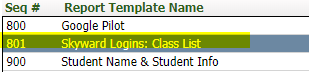
Hover over the Reports tab and select Class Roster. Locate the template named Skyward Logins: Class List and click Print:


To run the report as one page per student

Hover over the Reports tab and select Student Information. Locate the template named Skyward Logins: 1 Page per Student and click Print: